Guides Buyer's guide
Choosing a clapperboard app for iPhone.
Seven checks that separate a slate you can sync to from a picture of one: the flash, the sound, the timecode, the log, and what happens with no signal.
A half-second flash sounds quick until you count it: at 24 frames per second it lights 12 frames, and only one of them is the clap. If the flash fades in as well, nothing in those 12 frames tells the editor which one.
That is the first of seven checks below. Each works on any clapperboard app, most take a couple of minutes with the camera you already own, and together they separate a slate you can sync to from a picture of one. This is Clap's site, so Clap is the example of a pass. The checks hold for every app, Clap included.
The short answer
Choose the app whose clap lands on one frame: a white flash exactly one frame long with no fade, and a sharp sound that starts on that same frame from the phone's own speaker, not Bluetooth. Then check that it has your exact frame rate (23.976, 29.97 and 59.94 included), freezes the timecode on the clap, reads from the camera, numbers takes by itself, logs every clap into a report your editor can open, and works with no signal and no account.

Clap · film slate for iPhone
A slate that lands on one frame
On iPhone Duo, open it to slate and shut it to clap; on any iPhone or iPad, tap the sticks. Clap flashes for one frame to mark sync and logs every take with its timecode, ready to send as a camera report. It needs no account and shows no ads.


Reading on a computer? Point your iPhone’s camera at the code to install. No account needed. Or text me the link
1. The flash lasts one frame, with no fade
On a wooden slate, the sync mark is the frame where the sticks close; the editor lines it up with the spike of the clap in the sound. An app's flash has to be just as exact, and that comes down to how long it lasts:
| Frame rate | One frame lasts | A half-second flash covers |
|---|---|---|
| 23.976 fps | 41.7 ms | 12 frames |
| 29.97 fps | 33.4 ms | 15 frames |
| 59.94 fps | 16.7 ms | 30 frames |
A long flash only works if it starts at full brightness on the same frame as the sound. If it fades up, pulses or starts near the sound instead of on it, you are guessing. A one-frame flash leaves nothing to interpret: the frame is white or it isn't.
The test: clap the app at your camera, open the clip in your editing software and step through one frame at a time. A pass is a single white frame between ordinary ones. (The phone's screen isn't timed to the camera's shutter, so a one-frame flash can light part of one frame and the rest of the next. Take the first.)
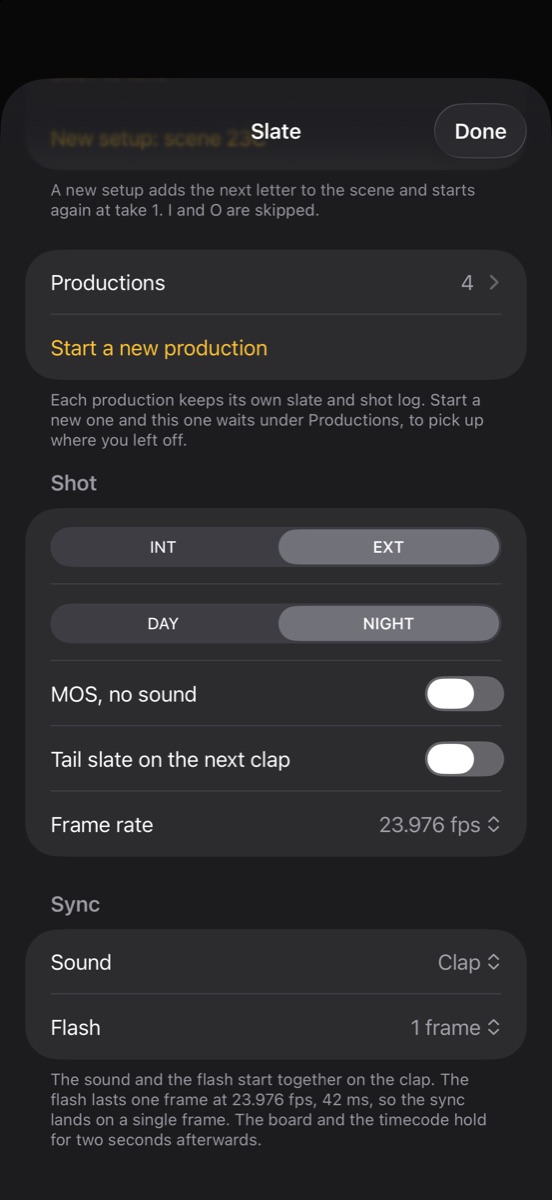
Clap's flash lasts exactly one frame at the slate's frame rate, with no fade, and the sticks snap shut on that same frame. A setting makes it two frames, or none.
2. The sound is a spike, and it comes out of the phone
Listen for the attack. A sharp clap draws a spike with a hard front edge in the waveform, which is what the editor lines up. A tone that swells in draws a slope, and a slope has no single frame. A beep works if it is short and hard: one frame long, it starts and ends inside the frame that matters.
The bigger trap is Bluetooth. If the phone is paired with earbuds or a speaker, the clap goes there, and standard Bluetooth audio commonly arrives 150 to 250 milliseconds late. That is four to six frames at 24 fps, and the delay drifts, so no single offset fixes it in the edit. Use the phone's own speaker.
Then flip the ring switch to silent and clap again. A slate that obeys silent mode will clap without a sound the day someone silences the phone for a take.
Clap plays a sharp clap or a 1 kHz beep one frame long, starting on the flash frame. It plays with the ring switch on silent, shows "Volume low" when the volume is down, and warns when sound is going to Bluetooth. The guide to syncing sound with an iPhone slate covers the edit.
3. Your exact frame rate, and a timecode that freezes
Look for 23.976, 29.97 and 59.94, not only 24, 30 and 60. A lot of what gets called 24p is really 23.976, exactly 24000/1001 frames a second, and the slate should say what the camera shot. Then watch the timecode at the clap. It should stop on the clap frame and hold, so the number in the shot matches the log.
A hardware timecode slate is jam-synced: its clock is set from the camera or sound recorder, so they all count the same frames. A phone app's time-of-day timecode comes from the phone's clock and, with no timecode input or output, isn't locked to your camera. Read it as a label of when the take happened, and sync on the clap. Crews with jam-synced slates still close the sticks, because timecode can drift over a long day.
Any app that implies its phone timecode will line up your footage owes you an explanation of how the camera learns it.
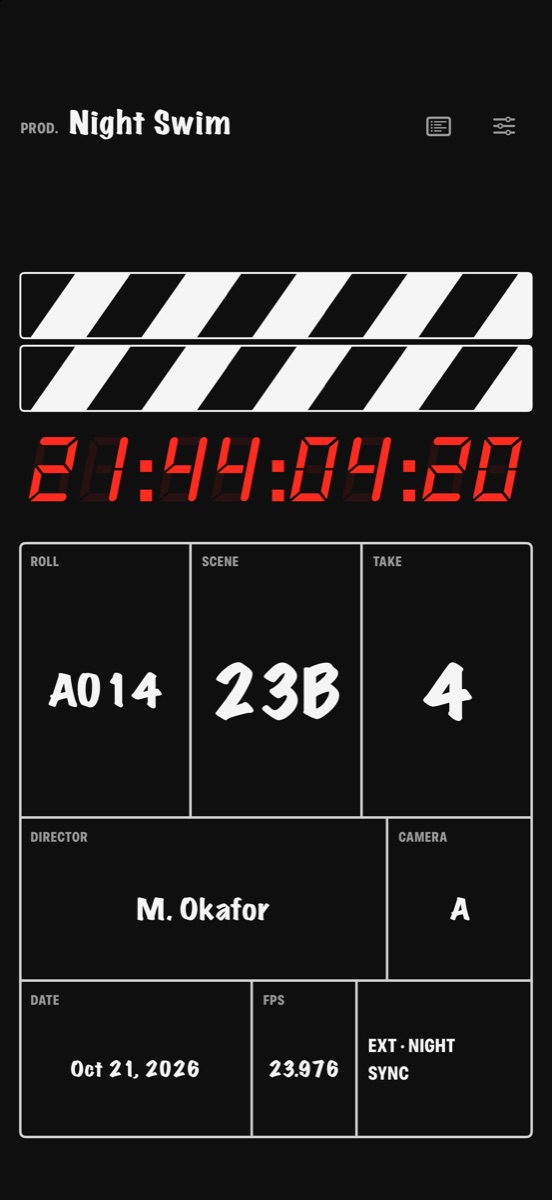
Clap runs time-of-day timecode in red LED digits at any of nine rates (23.976, 24, 25, 29.97, 30, 48, 50, 59.94 and 60), freezes it on the clap and holds the board for two seconds so it reads in the shot. It isn't jam-synced, and doesn't claim to be.
4. It reads from where the camera is
A phone is a small board, so the app has to spend its screen on scene, take and roll (the card or reel the take is on), big enough to read on a wide shot. Fine print fails first. Turn the phone sideways and see whether the layout uses the width; try an iPad if you have one.
A screen does beat wood in one way: it lights itself, so it reads at night without a lamp on it.
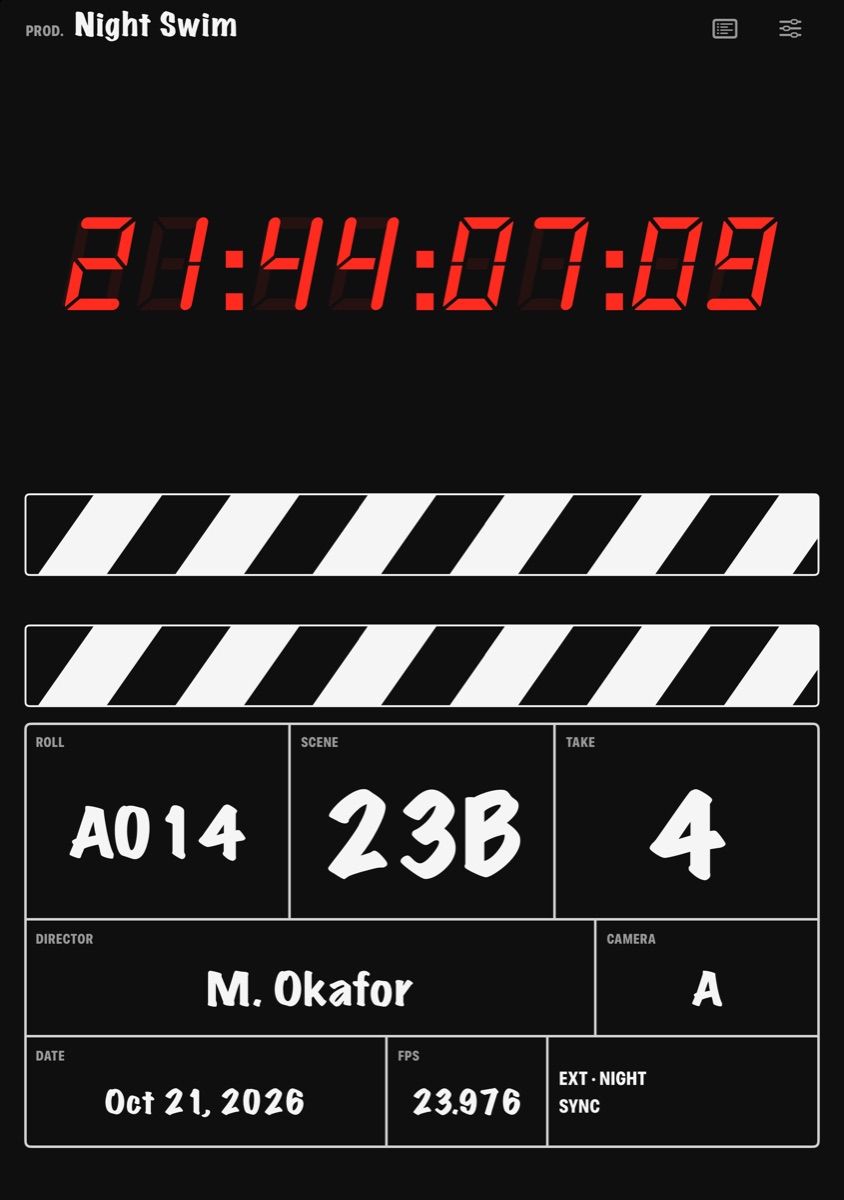
Clap letters scene, take and roll large on a black board. Sideways, the sticks and timecode sit beside the board; on iPad the slate fills the screen, scaled to read from across the set. On iPhone Duo, Apple's folding iPhone, the phone is the clapperboard: open it upright and half folded, and you shut it to clap. The clap sounds the instant the halves meet.
Clap · film slate for iPhone
A slate that lands on one frame
On iPhone Duo, open it to slate and shut it to clap; on any iPhone or iPad, tap the sticks. Clap flashes for one frame to mark sync and logs every take with its timecode, ready to send as a camera report. It needs no account and shows no ads.
Reading on a computer? Point your iPhone’s camera at the code to install. No account needed. Or text me the link
5. The numbers move on their own
A slate showing the wrong take is worse than a blank one, because the picture and the log disagree and someone has to reconcile them before anyone can cut. The number most likely to be wrong is the one nobody remembered to change, so the take should go up by itself on every clap. A new setup (a new camera position in the same scene) should add the next letter and start again at take 1, skipping I and O because on a slate they read as 1 and 0. After 23H comes 23J. Some crews skip more.
In Clap, the take advances on every clap, New setup goes 23, 23A, 23B with I and O skipped, and Back to take 1 is one tap. For every box on the board, see what to write on a film slate.
6. Every clap lands in a log your editor can open
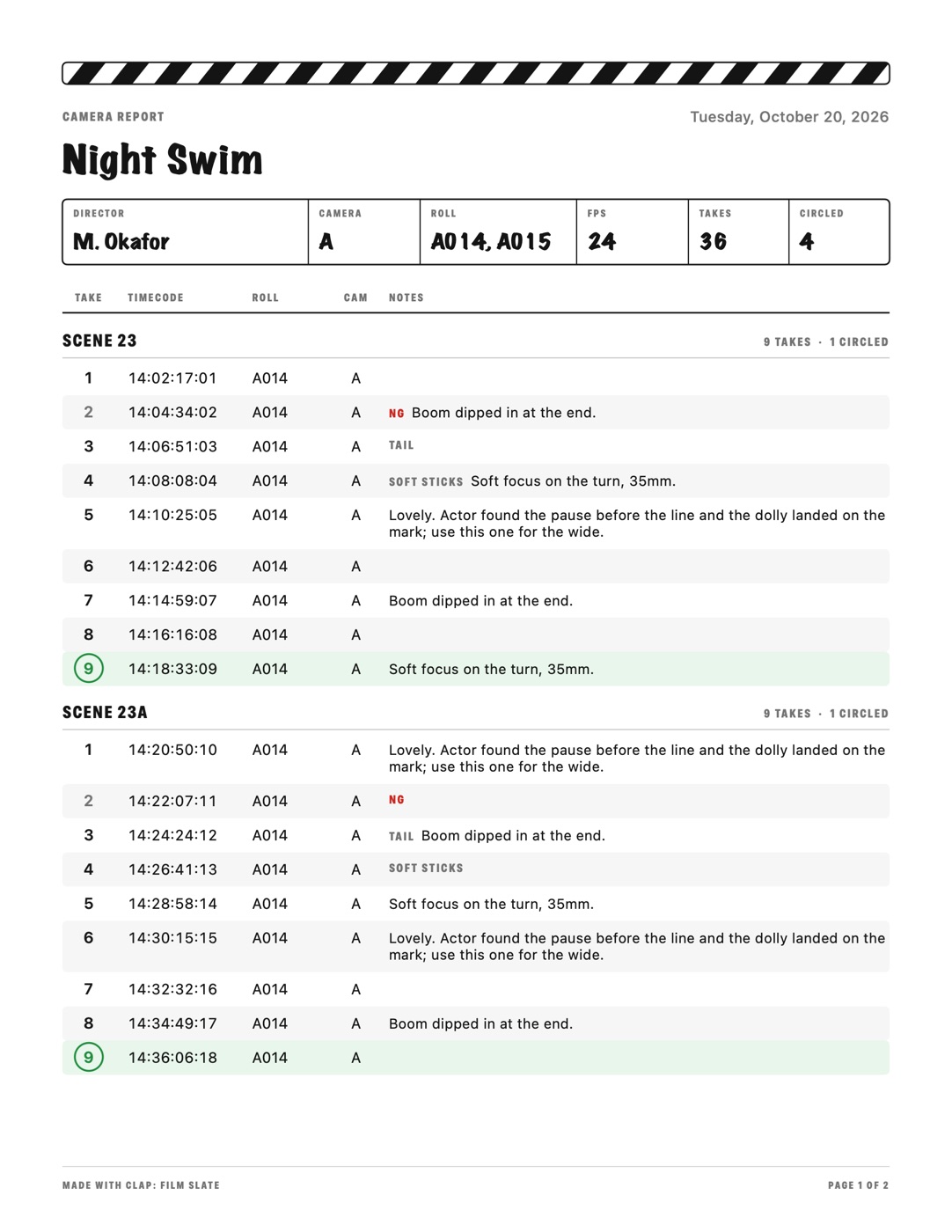
The slate tells the camera what a take is; the log tells the editor without scrubbing through a day of footage. On set, that log is the camera report, a sheet listing every take on a roll with its notes. An app that already knows when each clap happened should write it for you. Clap a few test takes and look for:
- every clap with its time and timecode, grouped by scene, with roll and camera
- circled takes (the director's keepers), NG (no good) and a note on any take
- MOS and tail-slated takes flagged
- an export that opens without the app, as a PDF and a spreadsheet file
The flags are easy to skip past, and they tell the editor where the mark is. A tail slate is clapped at the end of a take with the board upside down, so the mark is at the end of the clip. A MOS take has no sound at all (on a wooden slate, a hand over the sticks says so).
Clap logs all of it, flags included, with Undo for a stray clap, and the share sheet sends a PDF camera report or a CSV spreadsheet.
7. It works with no signal and no account
Plenty of locations get no signal, from a basement to a desert road at night. An app that has to sign in, sync or load an ad before it shows the slate fails at the worst moment. And why would a slate need an account? The board holds a production name, scene numbers and notes on performances, and none of that has to leave the phone.
Test it the hard way: airplane mode on, app closed completely, then open it and clap. It should go straight to the slate with yesterday's log intact.
Clap has no account, no ads and no tracking, works offline and keeps everything on the phone (see the privacy policy).
Run that airplane-mode test with the camera rolling and one clip answers most of this list. Do it the day before the shoot, when a failed check means switching apps instead of losing a take.
Clap · film slate for iPhone
A slate that lands on one frame
On iPhone Duo, open it to slate and shut it to clap; on any iPhone or iPad, tap the sticks. Clap flashes for one frame to mark sync and logs every take with its timecode, ready to send as a camera report. It needs no account and shows no ads.
Reading on a computer? Point your iPhone’s camera at the code to install. No account needed. Or text me the link
Questions
Can I use my iPhone as a clapperboard?
Yes. A slate app gives the editor what a wooden clapper does: a visual frame and a sharp sound that line up. The flash should last one frame with no fade, the sound should start on that frame, and it should play from the phone's speaker rather than Bluetooth, which arrives several frames late.
Is a free clapperboard app good enough?
Price tells you little about whether a slate app will sync. Film one clap at your frame rate and step through it frame by frame: a good app shows a one-frame flash with no fade and plays a sharp sound on that frame from the phone's speaker. Then look for your exact frame rate, automatic take numbers and a log you can export. A half-second flash costs more time in the edit than the app saved.
Does a slate app's timecode sync with my camera?
Not by itself. A hardware timecode slate is jam-synced, its clock set from the camera or sound recorder. A phone app shows time-of-day timecode from the phone's own clock, so without a timecode input or output it isn't locked to your camera. Use it as a visual record of when the take happened, and sync on the clap.
Why is the clap sound late on my slate app?
Usually the sound is going to Bluetooth earbuds or a speaker. Standard Bluetooth audio commonly arrives 150 to 250 milliseconds late, four to six frames at 24 fps, and the delay drifts, so one offset in the edit won't fix it. Disconnect Bluetooth and play the clap from the phone's own speaker.
What frame rate should I set on a slate app?
Exactly what your camera shoots. If its 24p is really 23.976 (24000/1001 frames a second), set 23.976, and choose 29.97 or 59.94 over 30 or 60 when that is what the camera records. In a well-made app the frame rate also sets how long the one-frame flash lasts: 41.7 milliseconds at 23.976 fps, 16.7 at 59.94.