Guides Slate guide
What to write on a film slate.
Every box on a clapperboard, filled in for a real setup: roll, scene and take, the letters you skip, and the marks for sync and MOS.
On a film slate, scene 23H is followed by 23J. Handwritten, an I looks like a 1, and nobody sorting footage weeks later should have to guess whether a take belongs to scene 23I or scene 231.
Almost everything on a clapperboard follows that logic. The slate is a label for one take, read once, quickly, by someone who wasn't there. Below, a filled-in example (a night exterior from a demo production called Night Swim) goes box by box, then come the marks for pickups, series and MOS, and a blank film slate template to copy.
The short answer
Write the production title, the roll (camera letter plus card or roll number, like A014), the scene number with a letter for each new camera setup (23, 23A, 23B, skipping I and O), and the take number, which goes up by one with every attempt. Then add the director, the camera letter, the date and the frame rate, mark INT or EXT and DAY or NIGHT from the script's scene heading, and write MOS when no sound is being recorded.

Clap · film slate for iPhone
A slate that letters the next setup for you
On iPhone Duo, open it to slate and shut it to clap; on any iPhone or iPad, tap the sticks. Clap flashes for one frame to mark sync and logs every take with its timecode, ready to send as a camera report. It needs no account and shows no ads.


Reading on a computer? Point your iPhone’s camera at the code to install. No account needed. Or text me the link
Production and roll
Here is the example. The three biggest boxes hold the numbers an editor files the clip under: roll A014, scene 23B, take 4.
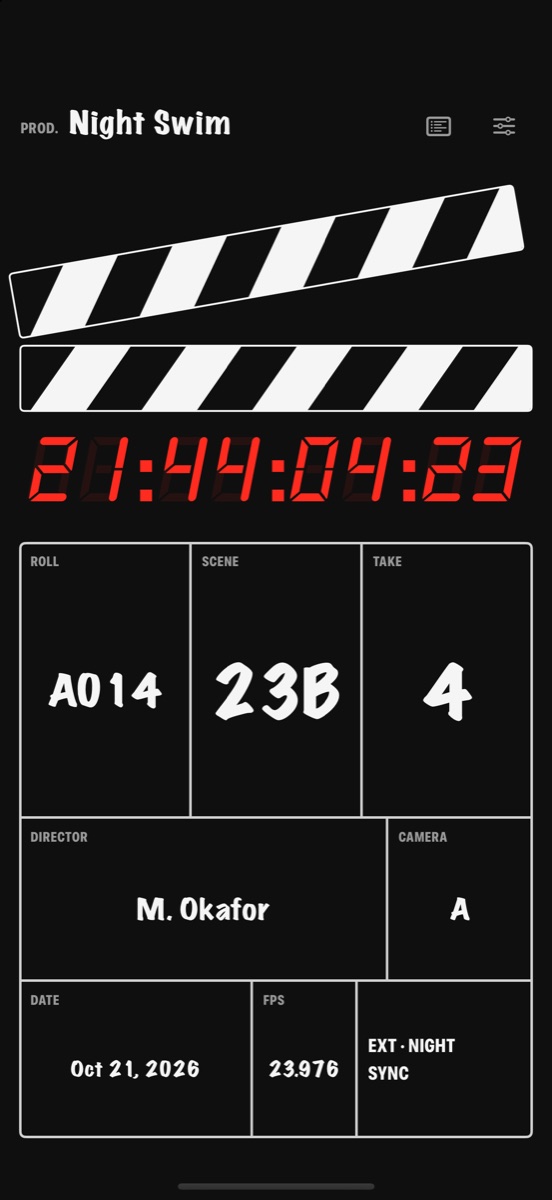
Production is the title, written once. A working title is fine. Pick one and keep it, because renaming a production after shooting starts breaks the consistency post-production relies on to file the footage.
Roll is a camera letter followed by a number, usually three digits. A001 is camera A's first roll. On film, a new roll starts each time a fresh magazine goes on the camera; on a digital shoot, each newly formatted card counts as a new roll, so A014 is camera A's fourteenth card. Some productions restart the count daily, so ask the camera assistants. Many digital cinema cameras put the same code in every clip name (the third clip on that card would be something like A014C003), and when slate and file name agree, a take can be traced from either end.
Scene numbers and the letters crews skip
The scene number comes from the shooting script, where every scene heading is numbered. The letter after it is the setup: a new camera position, angle or lens on the same scene. Scene 23's first setup is plain 23, the second 23A, the third 23B. Even a lens change with the camera standing still earns a new letter, because the shot is different.
I and O never appear. They read as 1 and 0, so 23H goes to 23J and 23N to 23P. Some crews drop S and Z as well, which pass for a 5 and a 2. After Z, the letters double: 23AA, 23AB. Read aloud before the clap (the voice slate), the letter becomes a word that can't be misheard: 23B is "twenty-three baker" or "twenty-three bravo."
None of these numbers is yours to invent. The script supervisor, who logs every take and tracks continuity, decides what each setup is called, and the second camera assistant (the 2nd AC or clapper loader, who runs the slate) writes it down. When they disagree, the script supervisor wins, since those notes are what the editor works from. Crews on the European system skip letters altogether and number every setup in one running count: slate 256, take 3.
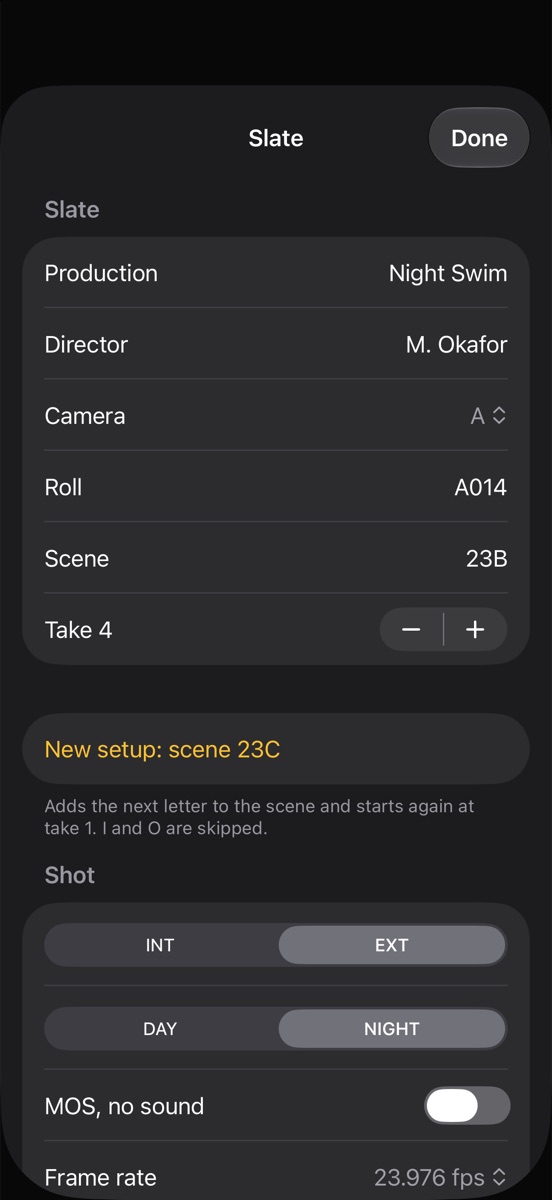
Clap letters setups for you. New setup turns 23B into 23C in one tap, skips I and O, and puts the take back to 1. If your crew skips S too, the scene is a plain text field: type 23T when 23S comes up.
Take numbers, pickups and series
The take is the attempt. The first time the camera rolls on a setup is take 1, and the count starts over only when the setup changes. A take that falls apart after three seconds still counts, and its number is gone for good. A skipped number costs nothing. A repeated one means a clip is misfiled.
Change the number straight after the clap, while the camera is still rolling, so the board is ready for the next take. Clap does this on its own: the take goes up with every clap, and Back to take 1 is a single tap. That's why the example already reads 4.
Two marks go beside the take number when they apply:
- PU (pickup): the take restarts partway through, from a flubbed line for instance, so it doesn't begin at the top of the scene. Write 23B, take 5 PU. Some script supervisors give a pickup the next setup letter instead, and it's their call.
- SER (series): several quick attempts with the camera rolling throughout. One clap, SER next to the take number, and no re-slating between attempts unless someone asks. To the camera, it's one take.
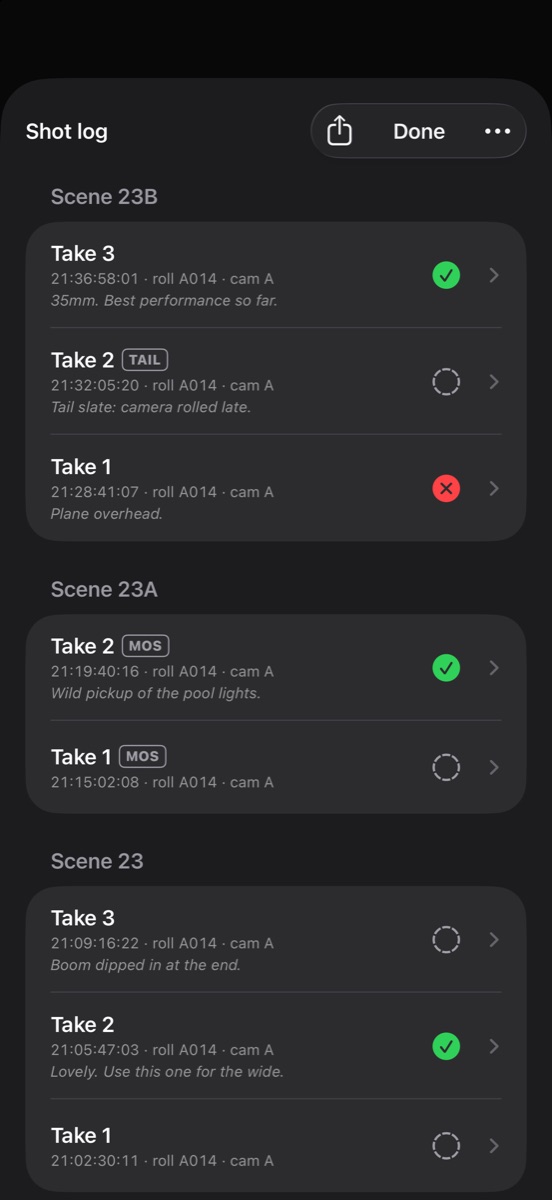
When the slate couldn't go in at the start, it goes in at the end, upside down. That's a tail slate, like take 2 of 23B above: how to call and log one.
Clap · film slate for iPhone
A slate that letters the next setup for you
On iPhone Duo, open it to slate and shut it to clap; on any iPhone or iPad, tap the sticks. Clap flashes for one frame to mark sync and logs every take with its timecode, ready to send as a camera report. It needs no account and shows no ads.
Reading on a computer? Point your iPhone’s camera at the code to install. No account needed. Or text me the link
Director, camera and date
Director is on the board by tradition. Spell it from the call sheet (the daily schedule with every name and call time), never from memory. It sits in the first frame of every clip.
Camera depends on the board. On many wooden slates the line marked CAMERA holds the name of the director of photography (the DP, in charge of the image), and the camera letter rides in front of the roll number. On the Night Swim slate it's the letter itself: A. With more cameras, the main one is A and the next is B, each with its own slate. Mark A even with one camera, so nothing needs relabeling if a second camera joins. In Clap, Camera is a letter from A to D.
Date is the shooting day, the one box that changes overnight. Write the month as a word, as the example does (Oct 21, 2026), because 10/11 is October 11 in the US and 10 November in most of Europe. Clap takes the date from the phone.
Frame rate, INT/EXT, DAY/NIGHT, SYNC or MOS
Frame rate is what the camera is recording at, copied exactly. Night Swim's 23.976 is not a sloppy 24. It's 24,000 divided by 1,001, the rate that fits North American (NTSC) television timing, and it runs 0.1% slower than true 24: one frame every 42 seconds, enough to walk sound out of sync over a long take if someone in post assumes the wrong rate. For slow motion, write the rate the camera is running at, 48 or 60, so the editor knows the clip is meant to play back slowed down.
INT/EXT and DAY/NIGHT come from the scene heading: EXT. POOL - NIGHT becomes EXT · NIGHT. Plenty of crews treat these boxes as optional. Fill them anyway; they let an editor sort a bin at a glance.
SYNC or MOS says whether sound is being recorded. SYNC means it is, and the clap is the mark that lines sound and picture up later. MOS means it isn't: no clap, a hand over or between the sticks (crews differ on holding them open or shut), and MOS goes on the board big enough to read, so nobody in post hunts for a sound file that doesn't exist.
Clap's MOS switch ("MOS, no sound") puts MOS on the slate in place of SYNC, makes the clap silent and logs the take as MOS, like both takes of 23A in the log above.
A blank film slate template
Copy this into a note or print it. The middle column says what goes in each box, with the Night Swim value in parentheses.
| Box | What to write | Your slate |
|---|---|---|
| Production | Title or working title, the same all shoot (Night Swim) | |
| Roll | Camera letter plus card or roll number (A014) | |
| Scene | Scene number plus setup letter, no I or O (23B) | |
| Take | Attempt number, from 1 for each setup (4) | |
| Director | Name as spelled on the call sheet (M. Okafor) | |
| Camera | Camera letter, or the DP's name on some slates (A) | |
| Date | Shooting day, month as a word (Oct 21, 2026) | |
| FPS | The camera's exact frame rate (23.976) | |
| INT/EXT | From the scene heading (EXT) | |
| DAY/NIGHT | From the scene heading (NIGHT) | |
| SYNC/MOS | SYNC if sound is recording, MOS if not (SYNC) | |
| Extras | PU or SER beside the take, when they apply (none) |
Fill it in block capitals, as large as each box allows. Editing software shows clips as small pictures, and some editors have their assistant set the slate frame as each clip's picture on purpose, so your lettering will be read at thumbnail size. Clap's roll and scene fields type in capitals, and on iPad the lettering scales up to read from across the set.
If roll, scene and take can still be read on a thumbnail, the slate has done its job.
Clap · film slate for iPhone
A slate that letters the next setup for you
On iPhone Duo, open it to slate and shut it to clap; on any iPhone or iPad, tap the sticks. Clap flashes for one frame to mark sync and logs every take with its timecode, ready to send as a camera report. It needs no account and shows no ads.
Reading on a computer? Point your iPhone’s camera at the code to install. No account needed. Or text me the link
Questions
What do you write on a clapperboard?
The production title, the roll (camera letter and card or roll number, such as A014), the scene number with a setup letter (such as 23B), the take number, the director, the camera letter, the date and the frame rate. Many slates also have INT/EXT and DAY/NIGHT boxes, copied from the script's scene heading, and a place to mark MOS when no sound is recorded.
What does the letter after the scene number mean on a slate?
It marks the setup: each new camera position, angle or lens within a scene gets the next letter. Scene 23's first setup is just 23, then 23A, 23B and so on, skipping I and O. The take number starts again at 1 with every new letter.
Why are I and O skipped on a film slate?
Handwritten, I looks like 1 and O looks like 0, so scene 23I could be read as scene 231. Crews go from H straight to J and from N to P. Some also skip S and Z, which can pass for 5 and 2; the script supervisor decides.
What does MOS mean on a slate?
MOS means the take is shot without sound. The slate is marked MOS so the editor doesn't look for a matching audio file, and the sticks aren't clapped. The origin of the letters is disputed; "motor only shot" and "mit out sound" are the usual explanations.
Do take numbers reset for each new shot?
Yes. Take numbers start at 1 for each new setup (23A take 1, 23B take 1) and go up by one with every attempt. An abandoned take still uses its number, and no number is used twice within a setup.
What is the roll number on a clapperboard?
It identifies the film roll or memory card the take is recorded on: the camera letter followed by a number, usually three digits, so A001 is camera A's first roll. On a digital shoot each newly formatted card counts as a new roll, so the slate should match the card in the camera.