Guides Paperwork guide
The camera report.
What a camera report records, who fills it in, the columns an editor reads, and a finished example made by a phone slate.
On a 35mm shoot, the lab printed only the takes someone had circled on a sheet of paper taped to the film can. Everything else was developed and left on the negative, unseen unless somebody asked for it later.
That sheet is the camera report. Digital did away with the lab and the printing, but the report survived. It still tells the next person in line what is on the roll, which take the director wanted and what went wrong in the others. Below: what goes on one, who keeps it, a template to copy, the six columns an editor reads, and a finished example from Clap's demo shoot, Night Swim.
The short answer
A camera report is the camera department's log of every take: production, date, camera, roll or card, scene, take and timecode, plus the director's circled takes, the NG (no good) takes and a note on anything that went wrong. The second assistant camera (the 2nd AC, called the clapper loader in the UK) fills it in take by take. It travels with the footage: to the lab on film, to the data team and the editor on digital.

Clap · film slate for iPhone
Every clap goes straight into the camera report
On iPhone Duo, open it to slate and shut it to clap; on any iPhone or iPad, tap the sticks. Clap flashes for one frame to mark sync and logs every take with its timecode, ready to send as a camera report. It needs no account and shows no ads.


Reading on a computer? Point your iPhone’s camera at the code to install. No account needed. Or text me the link
Why it exists
Film made the report a matter of what got printed. When a take was worth seeing, the director called "Print" after "Cut", and the 2nd AC, the script supervisor and the sound mixer each circled that take number on their sheets. The lab printed the circled takes for dailies (the rushes the director and crew watch the next day) and left the rest on the negative. That is where "circle takes" comes from.
Footage was the other reason. A 1,000-foot load of 35mm runs about 11 minutes at 24 frames per second: 16 frames to the foot, 90 feet a minute. Every one of those feet was accounted for. The report was taped to the magazine (the light-tight case that feeds film through the camera) when it was loaded, came off on set so the 2nd AC could fill it in, and was closed out at the end of the roll with "Out at" and the footage count. Then it split three ways. The top copy went on the can to the lab, the second to the editor, the third to the production office.
On digital, nothing gets printed, so the circle no longer decides what reaches the screening room. It tells the editor where to start.
Who fills it in
The 2nd AC. The same person runs the slate, so the board and the report are written by one hand and should agree line for line. The script supervisor keeps a parallel log, and the two check that every circled take appears on both.
Fill it in at the take, not at lunch. A report rebuilt from memory at wrap gets the take numbers right and the reasons wrong, and the reasons (why take 2 was NG, where the focus went soft) are the part no one else on set will remember by evening.
What goes on one
Two parts: a header that holds for the whole sheet, and one line per take.
The header names the production, the date, the director and the director of photography, the camera (A, B, C), the roll and the frame rate, with "sheet 1 of 3" so a missing page is obvious. On digital, "roll" means the card: A001 is camera A's first card, A002 its second, B001 the first from camera B.
Each take gets a line:
- Scene and take, exactly as they read on the slate: 23, 23A, 23B, with the letters I and O skipped so they can't pass for 1 and 0. (What to write on a film slate covers the numbering.)
- Timecode at the start of the take, or the clip name the camera gave it.
- Lens and T-stop. The focal length and the aperture; a T-stop is an f-stop measured by how much light the lens transmits.
- Filters, ISO, shutter, if the camera team tracks them: ND strength, diffusion, white balance.
- Circled or NG.
- Notes, including MOS (shot without sound), tail slate (slated at the end of the take, board upside down) and soft sticks (a gentle clap close to an actor's face).
A film report carries more: the stock and its emulsion number (the code on the can that identifies the batch the film was coated from), the magazine number, and the footage, meaning the camera's counter reading (the "dial") and the feet each take used. The footage is how the roll gets closed out with "Out at" and a figure. Processing instructions for the lab go on the sheet too, such as "print normal", "one light" or "push 1 stop". Those footage totals end up on the production report, which is how the production office knows how much unexposed stock it has left.
Camera report template
Copy this grid. Above it goes the header; for this sheet, that's Night Swim, Tuesday, October 20, 2026, director M. Okafor, camera A, roll A014, 24 fps, sheet 1 of 2. The rows are the first takes of scene 23 from Clap's demo shoot, with a lens and stop added as an example.
| Scene | Take | Roll | Timecode | Lens | Stop | Mark | Notes |
|---|---|---|---|---|---|---|---|
| 23 | 1 | A014 | 14:02:17:01 | 35mm | T2 | ||
| 23 | 2 | A014 | 14:04:34:02 | 35mm | T2 | NG | Boom dipped in at the end. |
| 23 | 3 | A014 | 14:06:51:03 | 35mm | T2 | Tail slate. | |
| 23 | 4 | A014 | 14:08:08:04 | 35mm | T2 | Soft sticks. Soft focus on the turn. | |
| 23 | 9 | A014 | 14:18:33:09 | 35mm | T2 | Circled | Soft focus on the turn. |
Takes 5 to 8 are left out; the full report is further down. Two habits to steal from this sheet besides its columns: every NG has a reason, and the circled take still carries a warning.
Clap · film slate for iPhone
Every clap goes straight into the camera report
On iPhone Duo, open it to slate and shut it to clap; on any iPhone or iPad, tap the sticks. Clap flashes for one frame to mark sync and logs every take with its timecode, ready to send as a camera report. It needs no account and shows no ads.
Reading on a computer? Point your iPhone’s camera at the code to install. No account needed. Or text me the link
The six columns an editor reads
An editor opens a camera report with three questions. Where is the take? Which one did the director like? What's wrong with it? Six columns answer them. The rest of the sheet belongs to the camera department.
Where is the roll plus the timecode, and the roll does more work than it looks. Time-of-day timecode repeats every 24 hours: 14:02:17:01 comes around every afternoon of the shoot. Only the roll or card name, with the date, pins it to one take.
Which one is scene, take and the circle. NG matters as much as the circle, because it tells the editor what not to sit through.
What's wrong is the notes column, and it saves the most time of any. "Boom dipped in at the end" on a take that isn't NG means the take works until its last seconds. The flags change how a take gets synced: MOS means there is no sound to look for, a tail slate puts the sync mark at the end of the clip, and soft sticks means a quiet clap on the waveform. The best line in the template above is take 9: the director's pick, with a note that the focus went soft on the turn. Use the take, cut away before the turn.
Lens, stop and filters earn their place later, when a shot has to be matched: a pickup, a reshoot, a visual effects plate. Some 2nd ACs keep them in a separate notebook and attach it to the production copy at the end of the day. Short on time, fill those six and let the rest wait.
A finished example, from Clap
Clap is a film slate for iPhone and iPad, and it writes the report from the claps. Each clap logs the production, scene, take, roll, camera and timecode in the shot log, and the take number goes up by itself. Circle the keepers, mark NG, tap a take to add a note. Export turns the log into a PDF camera report or a CSV spreadsheet through the share sheet.
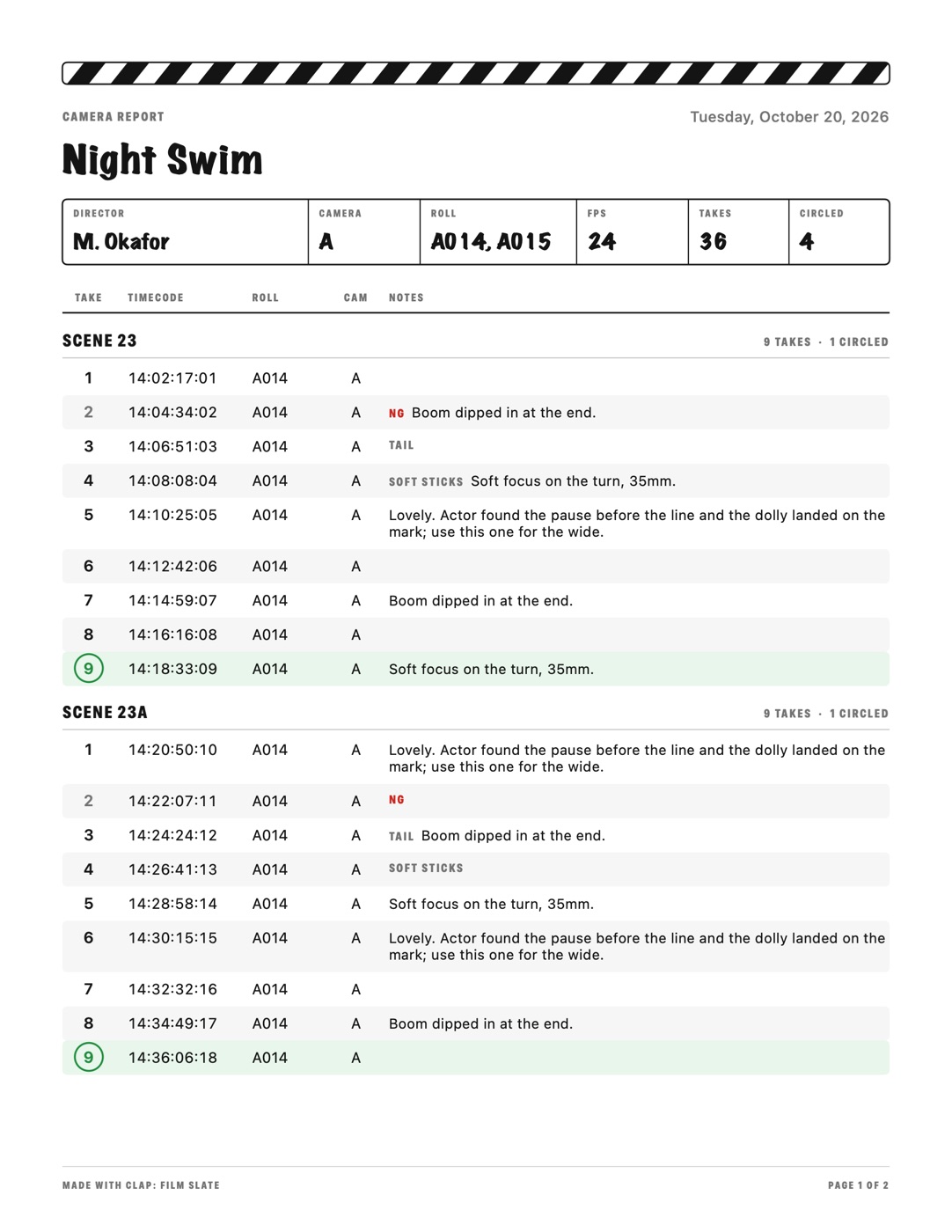
Across the top: the production and the date, then director, camera, roll, frame rate, takes and circled, boxed like the slate's board. Below, every take grouped by scene in the order shot, each scene headed with its count ("9 takes · 1 circled"), each line with take number, timecode, roll, camera and notes. NG prints in red. The file is named for the production and the day (Night Swim 2026-10-20.pdf), prints on Letter or A4 depending on the phone's region, and reads fine attached to an email or a message.
The CSV is the same log, one row per take, for the editor's spreadsheet. Its columns: Date, Time, Timecode, Production, Roll, Scene, Take, Camera, FPS, Mark, MOS, Tail, Soft sticks, Note. Mark reads Circled or NG; MOS, Tail and Soft sticks read Yes. Take 9 comes out as 2026-10-20,14:18:33,14:18:33:09,Night Swim,A014,23,9,A,24,Circled,,,,"Soft focus on the turn, 35mm."
Clap's report holds only what the slate and the log know. It doesn't record picture or sound, so it has no clip names, lens data, T-stops, ISO or footage. Put the lens and stop in the take's note, which is where Night Swim's "35mm" lives. And Clap's timecode comes from the phone's clock without a jam-sync to the camera, so the number on the report is the number frozen on the board in the shot: a way to find the take by eye, not a code to conform the edit from.
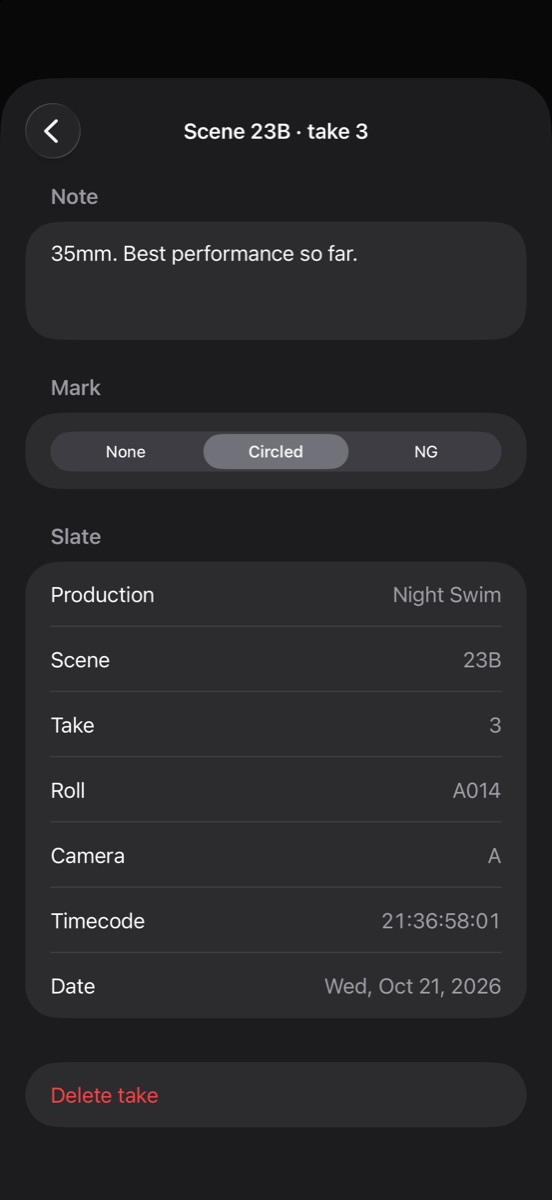
On iPhone Duo, the circle can go on without opening the phone. Shut it to clap, and the cover shows the take just logged with Circle, NG and Undo, plus a button for a note.
When to hand it over
With the footage, every time. On film that meant per roll: the report closed out at "Out at", the top copy taped to the can, the can to the lab. On digital it means per card. When a card comes out of the camera, its page goes with it to the DIT (digital imaging technician) or data wrangler, the people who copy and check the footage, so the files can be matched to takes during the offload. At wrap, copies go to editorial and the production office the same day.
A report that turns up a day late has already been worked around. Treat the page as part of the card: a card isn't finished until its page is.
Clap · film slate for iPhone
Every clap goes straight into the camera report
On iPhone Duo, open it to slate and shut it to clap; on any iPhone or iPad, tap the sticks. Clap flashes for one frame to mark sync and logs every take with its timecode, ready to send as a camera report. It needs no account and shows no ads.
Reading on a computer? Point your iPhone’s camera at the code to install. No account needed. Or text me the link
Questions
What is a camera report in film?
A camera report is the camera department's log of every take shot on a roll or card: production, date, camera, roll, scene, take, timecode, which takes the director circled, which were NG (no good), and notes on problems. Film reports add the stock, emulsion number, magazine and footage. It travels with the footage so the lab, the data team and the editor know what's on it.
Who fills out the camera report?
The second assistant camera (2nd AC), called the clapper loader in the UK. The 2nd AC also runs the slate, so the report and the board match, and checks circled takes against the script supervisor's notes. The report should be filled in take by take on set, not reconstructed at wrap.
What does a circled take mean?
A circled take is one the director wants, usually called with "Print" after "Cut". The camera assistant, script supervisor and sound mixer circle the take number on their logs. On film, the lab printed only circled takes for dailies; on digital, the circle tells the editor which take the director preferred. NG marks the opposite: a take that's no good.
What is the difference between a camera report and a sound report?
The camera report is kept by the camera department and logs picture: camera roll or card, scene, take, timecode, lens and circled takes. The sound report is kept by the sound recordist and logs audio: sound roll, scene, take, which camera roll it goes with, and whether each take was sync or wild. Editors use both to match sound to picture.
Can an app make a camera report?
Yes. A slate app that logs every clap already holds most of a camera report: scene, take, roll, camera and timecode. Clap, a film slate for iPhone and iPad, exports that log as a PDF camera report or a CSV spreadsheet, with circled and NG takes, MOS and tail slates, and a note per take. It doesn't record lens or T-stop on its own, so those go in each take's note.